Learning objectives
After this section, you will be able to:
create a minimal
requirements.txtfor a repository with a Jupyter Notebook;explain why version constraints matter for reproducibility.
For a Jupyter Notebook, requirements.txt is often the simplest environment file. Put one package requirement per line.
numpy
pandas
matplotlib
scikit-learn
repo2docker will install these packages when building the environment to run the Jupyter Notebook.
Pinning versions
A package name alone does not say which release should be installed. If dependencies change, a notebook that works today may behave differently later.
For teaching material or a reproducible example, you can pin versions:
numpy==2.0.1
pandas==2.2.2
matplotlib==3.9.1
scikit-learn==1.5.1
Exact pins improve repeatability, but they also need maintenance. A practical approach is to test the environment regularly and update pins deliberately rather than leaving them unchanged indefinitely.
When using requirements.txt, repo2docker can read a Python version from runtime.txt. The current syntax is:
python-3.11Use runtime.txt only when the main environment specification cannot already express the runtime version. If you use environment.yml, put the Python version there instead.
Exercise
We will use this sample repository to create a requirements.txt file which will then allow you to launch the repository in Jupyter4NFDI using repo2docker.
Create your own copy of the repository using this template:

Working in your own copy of the repository add a
requirements.txtfile which specifies the Python packages needed to run the code in the sample Jupyter Notebook in this repository.The contents of the
requirements.txtshould be
pandas==3.0.5
altair==6.2.2
Once you added the
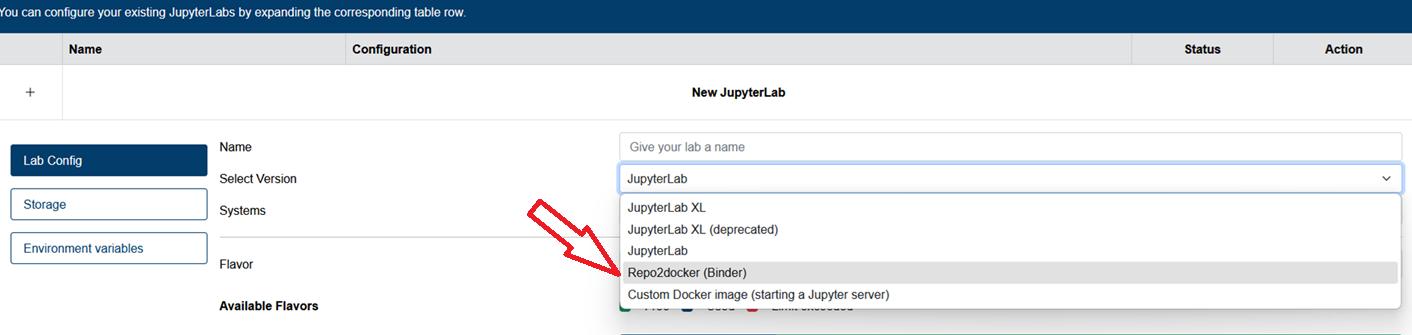
requirements.txtfile, log into Jupyter4NFDI and in the Dashboard selectrepo2dockeroption.