Learning objectives
After this section, you will be able to:
prepare a small repository that repo2docker can build;
identify the minimum files needed for your own example;
make a first reproducible environment without writing a Dockerfile.
The fastest way to understand repo2docker is to prepare a very small repository and launch it.
Using requirements.txt
Use this template to learn how to prepare contents with Jupyter Notebook to be Jupyter4NFDI ready (using repo2docker).
Create your own copy of the repository using this template:

Working in your own copy of the repository add a
requirements.txtfile which specifies the Python packages needed to run the code in the sample Jupyter Notebook in this repository.The contents of the
requirements.txtshould be
pandas==3.0.5
altair==6.2.2
Once you added the
requirements.txtfile, log into Jupyter4NFDI and in the Dashboard selectrepo2dockeroption.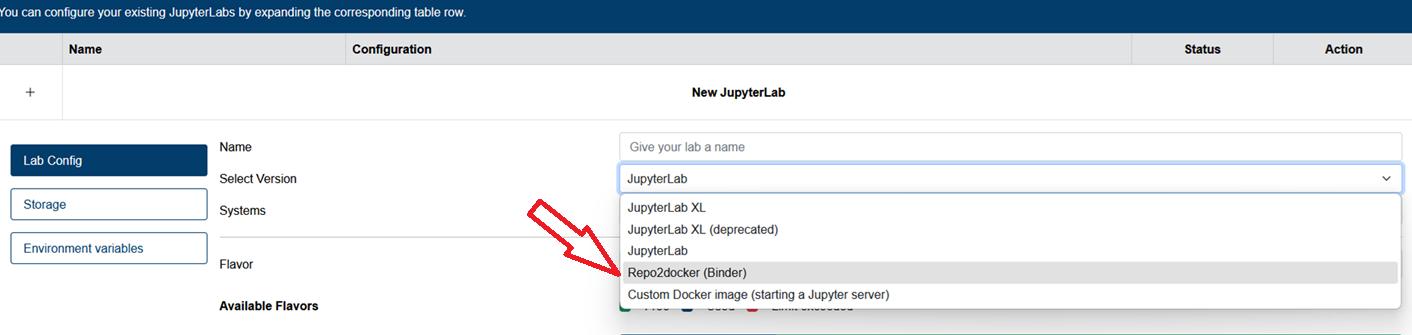
Note
A common problem when making your code portable are hardcoded file paths. Check the notebook for paths such as:
pd.read_csv("C:/Users/name/Desktop/data.csv")Replace machine-specific paths with paths relative to the repository, for example:
pd.read_csv("data/data.csv")