Learning objectives
Select an approved GPU-enabled server profile.
1. Start a GPU-enabled Jupyter server
Sign in at Jupyter4NFDI using the Helmholtz ID login associated with your GPU invitation.
Start a new server and locate a GPU-enabled profile for JSC-Cloud or deNBI-Cloud. Available labels may differ from those in this lesson.
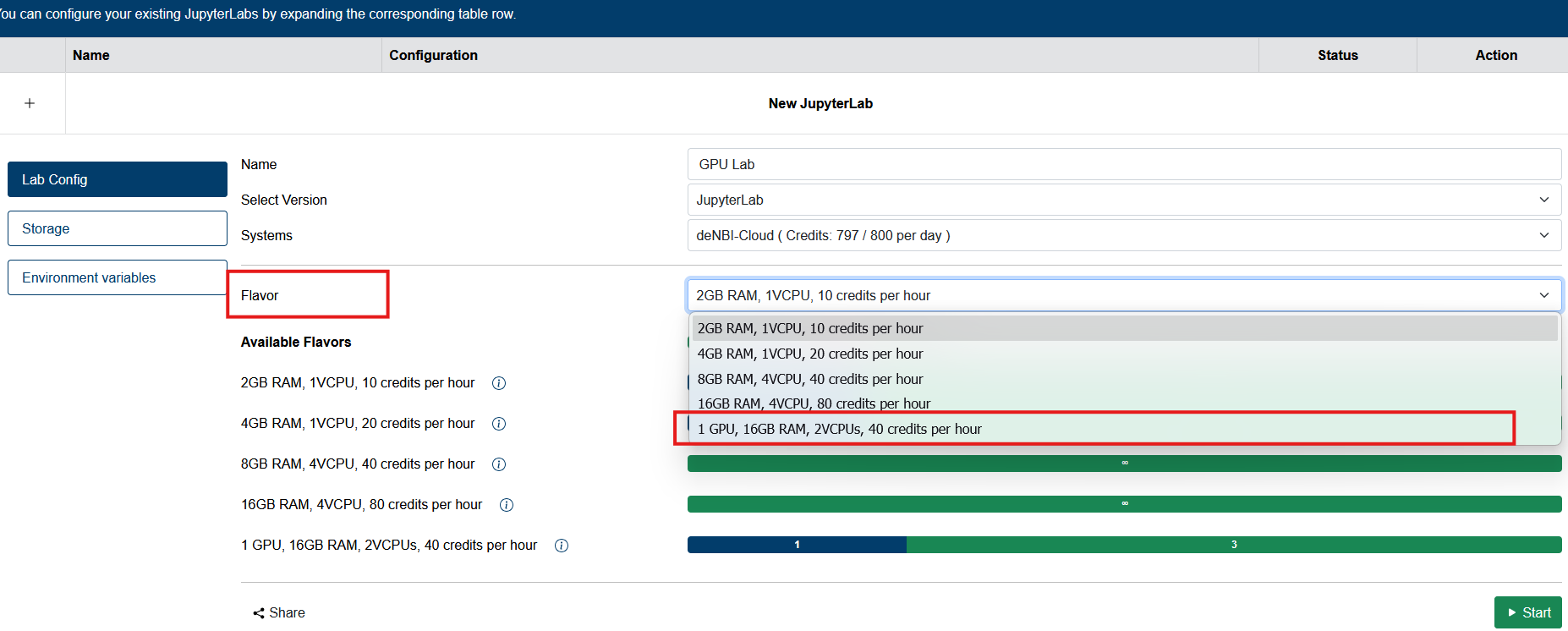
Launch the server. Because resources are shared, a GPU may not be immediately available even if your account is approved.
2. Inspect the allocated device
Open a terminal in JupyterLab and run this command:
nvidia-smiIf the command is present and the GPU is exposed to your session, it normally shows information about the visible NVIDIA device, memory allocation and driver. Depending on the cloud sharing setup, the output may reflect a MIG partition or a time-shared device, rather than exclusive use of an entire GPU.
It will look similarly to this:
+-----------------------------------------------------------------------------------------+
| NVIDIA-SMI 570.124.06             Driver Version: 570.124.06      CUDA Version: 12.8     |
+-----------------------------------------+------------------------+----------------------+
| GPU  Name                 Persistence-M  | Bus-Id          Disp.A | Volatile Uncorr. ECC |
| Fan  Temp   Perf          Pwr:Usage/Cap  |           Memory-Usage | GPU-Util  Compute M. |
|                                         |                        |               MIG M. |
|=========================================+========================+======================|
|   0  NVIDIA A100-PCIE-40GB          On   | 00000000:01:00.0  Off |                    0 |
| N/A   42C    P0              48W / 250W |     512MiB / 40960MiB |      0%      Default |
|                                         |                        |                  N/A |
+-----------------------------------------+------------------------+----------------------+

+-----------------------------------------------------------------------------------------+
| Processes:                                                                              |
|  GPU   GI   CI              PID   Type   Process name                        GPU Memory |
|        ID   ID                                                               Usage      |
|=========================================================================================|
|  No running processes found                                                             |
+-----------------------------------------------------------------------------------------+
If the command is missing or fails: you may be on a CPU-only server, the device may not be exposed, or the command may not be available in the image. Check the selected server profile and seek support if necessary.